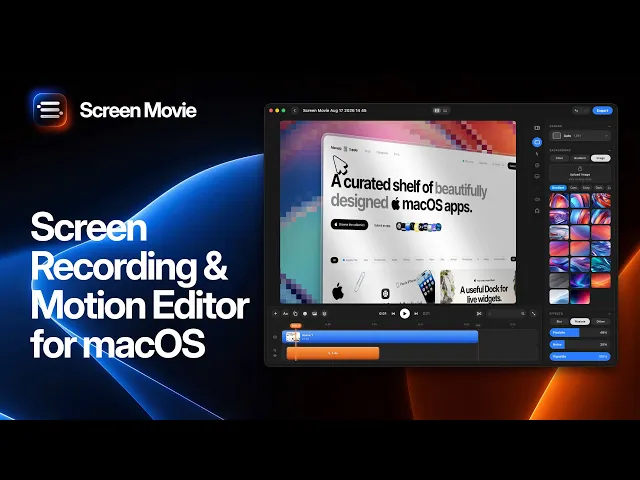
8 Best One-Time Purchase Screen Recorders for Mac (No Subscription) in 2026
Screen recording apps on Mac have been sliding toward subscriptions. Screen Studio is now $29/month or $108/year, Camtasia is subscription-only, and Loom and Tella bill per user per month. If you record a few demos or tutorials a month, renting your screen recorder adds up fast.
Good news: there are still excellent Mac screen recorders you can buy once. But “one-time” doesn’t always mean the same thing. Some include updates forever, others include one year and then charge for upgrades.
Below are the best options, with prices and what happens to updates after you pay. Pricing reflects the supplied October 2026 research; approximate prices and license terms should be confirmed before publishing.
Disclosure: Screen Movie is our app. We’ve included it where we honestly think it fits, and listed every other tool’s trade-offs and pricing.

Quick comparison
App | One-time price | Updates after purchase | Best for |
|---|---|---|---|
Screen Movie | $39 | Lifetime updates included | Polished demos, launch videos, motion design |
CleanShot X | $35 | 1 year, then $19/year to keep updating | Screenshots and quick recordings |
ScreenFlow | ~$169 | Major versions are paid upgrades | Traditional screencast editing |
Screen Charm | ~$99 | Lifetime license; confirm update terms | Auto-zoom demos |
Cap | $58 desktop license (or $29/year) | Check current terms | Open-source, Loom-style sharing |
FocuSee | $199.99 for version 2.x | Locked to 2.x | Auto-zoom tutorials |
OBS Studio | Free | Free | Streaming, complex scenes |
QuickTime / Screenshot app | Free with macOS | With macOS | One-off, unedited captures |
Subscription-only (not on this list): Screen Studio ($29/month or $108/year), Camtasia (from $179.88/year for Essentials), Loom (paid plans billed per user), Tella (from $13/user/month billed yearly).
What to check before you “buy once”
Update policy. Lifetime updates means the app keeps improving at no extra cost. One year of updates means you keep the version you have, and pay again for new macOS support and features.
Major-version upgrades. Some apps sell version 11, then charge again for version 12.
What’s in the base price. Cloud hosting and AI features are often a separate subscription. That’s fine if they’re optional and the app is fully usable without them.
Mac compatibility. Check the minimum macOS version. Newer apps often need a recent macOS to use modern capture APIs.
Refund window. A money-back guarantee lowers the risk of trying a newer app.
1. Screen Movie: best one-time screen recorder for polished videos
Price: $39 one-time, lifetime updates. Optional Cloud add-on ($9/month or $90/year) for share links and AI credits.
Requires: macOS 15 or later.
Screen Movie is a native Mac screen recorder with a built-in video editor and motion design tools. It’s built for founders, designers and creators who need demo videos that look professionally edited, without learning a pro editor.
What you get for $39
Screen, window or area recording with mic and system audio
Up to two cameras at once: built-in, external, iPhone or iPad, each on its own track
Automatic zoom that follows your cursor, with editable keyframes
Cursor smoothing and custom cursor styles
A multi-scene timeline for trimming, cutting and arranging recordings
40+ motion presets, 3D rotation, 3D device mockups, animated text and shapes
Backgrounds, including animated shader backgrounds, plus shadows, frames and lighting
Captions and 4K export
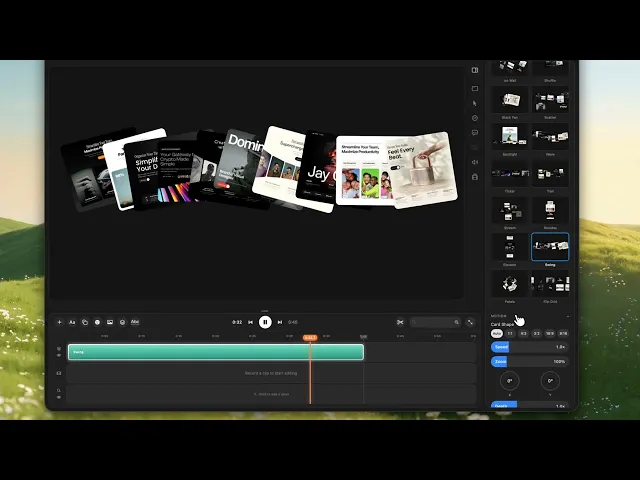
Pros: lowest price among the polished auto-zoom tools listed here; lifetime updates; extensive motion design tools; 14-day money-back guarantee.
Cons: newer app with a smaller community than ScreenFlow or CleanShot X; needs macOS 15+; hosted share links are a paid add-on.
Best for: indie hackers, SaaS founders and creators making product demos, launch videos and social clips.
2. CleanShot X: best for screenshots plus quick recordings
Price: $35 one-time (CleanShot Basic), includes one year of updates and 1 GB of cloud storage. After that, updates are $19/year. Cloud Pro is $10/user/month billed annually.
CleanShot X is the go-to screenshot tool on Mac, and its screen recorder is excellent for short clips: record an area, show clicks and keystrokes, trim, and share as MP4 or GIF.
Pros: best-in-class screenshots, annotations and scrolling capture; fast; very mature.
Cons: not a video editor. No auto zoom timeline, no motion design, no multi-track editing. Updates stop after a year unless you renew.
Best for: bug reports, quick how-to clips and anyone who takes lots of screenshots. Many people pair it with a dedicated video tool. See our CleanShot X alternatives.
3. ScreenFlow: best for traditional screencast editing
Price: about $169 for a full license (one-time). New major versions are paid upgrades.
ScreenFlow by Telestream has been the classic Mac screencast editor for years. You get a full multi-track editor with callouts, annotations, text, transitions and audio tools.
Pros: powerful, proven, deep editing.
Cons: a higher upfront price than Screen Movie, CleanShot X or Cap; zooms and cursor effects are mostly manual, so polished demos take longer; steeper learning curve.
Best for: course creators and trainers who edit long tutorials frame by frame.
4. Screen Charm: one-time auto-zoom recorder
Price: about $99 one-time on its own site (September 2026), lifetime license. Confirm whether future updates are included.
Screen Charm focuses on the Screen Studio-style workflow: automatic zoom, smooth cursor and clean backgrounds, sold as a one-time purchase.
Pros: one-time price for the auto-zoom workflow.
Cons: more than twice the price of Screen Movie for a comparable core workflow; fewer motion design tools.
Best for: people who want auto-zoom demos and prefer its specific interface.
5. Cap: open-source, with a one-time desktop license
Price: free for personal use. Commercial desktop license: $58 one-time or $29/year. Cap Pro (cloud) is billed per user per month.
Cap is an open-source screen recorder positioned as a Loom alternative, with instant share links and a studio mode for higher-quality recordings.
Pros: open source; free for personal use; quick sharing.
Cons: cloud features are a subscription; editing and motion tools are lighter than dedicated demo apps. Check the current update and commercial license terms.
Best for: developers and teams who want an open-source Loom replacement.
6. FocuSee: one-time license, but with a catch
Price: $199.99 one-time for version 2.x. The current plans are subscriptions (from $49.99/year). Confirm that the version-specific one-time option is still available.
FocuSee offers auto zoom, cursor effects and captions. The one-time license covers the 2.x version line only.
Pros: auto zoom and tutorial features.
Cons: the most expensive one-time option listed here, and it’s tied to one major version.
Best for: people who specifically need FocuSee’s feature set and are happy to stay on 2.x.
7. OBS Studio: best free option for complex recordings
Price: free and open source.
OBS is the standard for streaming and multi-source recording: scenes, overlays, multiple cameras and audio mixing.
Pros: free; endlessly configurable.
Cons: no built-in editor, no auto zoom; setup takes time, and system audio on Mac may need extra configuration.
Best for: streamers and people who are comfortable editing in a separate app.
8. QuickTime Player and the Screenshot app: free and built in
Price: free with macOS. Press Shift + Command + 5 to open the screen recording controls.
Pros: nothing to install; fine for a quick, unedited capture.
Cons: basic trimming only; no zoom, backgrounds or cursor effects. See our guide to recording internal audio on Mac if you need system sound.
Best for: one-off captures you’ll never edit.
Which one-time screen recorder should you buy?
You want videos that look professionally edited, for the lowest one-time price among the demo tools here: Screen Movie ($39, lifetime updates).
You mostly take screenshots and short clips: CleanShot X ($35, plus $19/year if you want updates).
You edit long tutorials and want a classic editor: ScreenFlow (~$169).
You want open source: Cap (free personally) or OBS (free).
If you’re coming from Screen Studio because of its subscription, read our side-by-side Screen Studio vs Screen Movie comparison.
FAQ
What is the best one-time purchase screen recorder for Mac?
For polished demo and launch videos, Screen Movie is the best value at $39 one-time with lifetime updates, auto zoom, motion presets and 4K export. For screenshots and quick clips, CleanShot X ($35) is the classic choice.
Is Screen Studio a one-time purchase?
No. Screen Studio is now subscription-only: $29/month, or $108/year billed yearly.
Is there a free screen recorder for Mac?
Yes. macOS includes one (Shift + Command + 5, or QuickTime Player), and OBS Studio is free and open source. Neither includes automatic zoom or demo-style editing.
Does “one-time purchase” include future updates?
Not always. Screen Movie includes lifetime updates. CleanShot X includes one year, then $19/year. ScreenFlow and FocuSee charge for new major versions. Always check the update policy before buying.
Which one-time screen recorder has automatic zoom?
Screen Movie ($39), Screen Charm (~$99) and FocuSee ($199.99 for 2.x) offer automatic zoom with a one-time option. Check current availability and license terms before buying.
Related reading
Sources: CleanShot pricing, Screen Studio, Screen Charm comparison (September 30, 2026), and Tight Studio roundup (August 29, 2026). Prices may change; check each official site before buying.
Editorial check before publishing: re-check ScreenFlow, Cap, Screen Charm and FocuSee on their official pricing pages. Their prices and license terms in the supplied research came from third-party roundups. Re-check CleanShot X and Screen Studio pricing as well.
