The Best Loom Alternatives for Mac in 2026: 8 Tools Compared
Looking for the best Loom alternative for Mac? Loom is useful for quick asynchronous messages, but product teams and creators often need more control after recording: a local editing timeline, camera tracks, captions, polished motion, and a high-resolution export.
This guide compares eight Loom alternatives for macOS. Screen Movie is the leading option here for people who want to turn a screen capture into a finished product demo, tutorial, launch video, or social clip in one native Mac workflow.
Loom alternatives at a glance
App | Best for | Why consider it |
|---|---|---|
Screen Movie | Polished screen videos | Native Mac recording, timeline editing, captions, camera tracks, motion, and 4K export |
OBS Studio | Free advanced production | Flexible scenes, sources, audio controls, and streaming |
ScreenFlow | Traditional screencasts | Screen, camera, and microphone capture with multitrack editing |
CleanShot X | Quick capture | Screenshots, annotations, and lightweight recordings |
Screen Studio | Presentation-led demos | A refined workflow for demo-style screen recordings |
Camtasia | Training content | Structured tutorials, annotations, and instructional editing |
Tella | Presenter videos | Screen, camera, and presentation-style layouts |
Descript | Transcript-led editing | A text-first approach to editing narrated video |
1. Screen Movie — best Loom alternative for finished screen videos
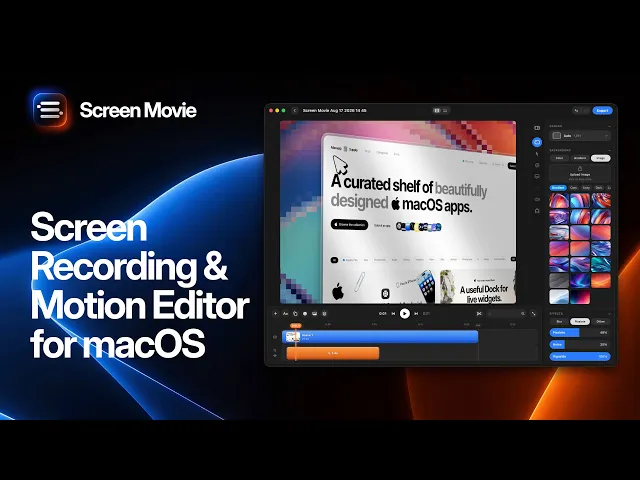
Screen Movie is a native macOS screen recorder and video editor built for the work that happens after capture. Record a display, app window, or selected area, then turn the footage into a clear, branded video without moving between separate capture and editing apps.
Why Screen Movie is a strong alternative to Loom
Screen Movie gives you an editable multi-scene timeline for trimming, arranging clips, cutting sections, and building a complete story. Add automatic captions, animated text and images, music, cursor styling, click highlights, backgrounds, gradients, lighting, overlays, shadows, borders, and cinematic motion to make the result feel intentional rather than like a raw recording.
It is also designed for richer presenter setups. You can record your screen with up to two cameras at the same time, using a built-in camera, external camera, iPhone, or iPad, then edit each camera as a separate timeline track. Keyframed zoom, cursor-following motion, 3D rotation, 3D device mockups, more than 40 motion presets, and 4K export help turn a walkthrough into a finished visual asset.

Best for
Founders, designers, marketers, educators, and product teams that need a Loom alternative for product demos, tutorials, launch clips, customer onboarding, and social video — especially when local editing control and presentation quality matter.
2. OBS Studio — best free Loom alternative for advanced setups
OBS Studio is a free, open-source option for people who need flexible scenes, multiple sources, audio mixing, transitions, hotkeys, and streaming. It is powerful for complex production, although it is less focused on a simple, polished editing workflow after recording.
3. ScreenFlow — best for traditional screencast editing
ScreenFlow is a Mac-focused screen recorder and editor for conventional screen, camera, and microphone workflows. It is a strong fit for longer training videos, established screencasts, and creators who prefer a familiar multitrack editing approach.
4. CleanShot X — best for lightweight capture and annotations
CleanShot X works well when the main output is a screenshot, annotated image, scrolling capture, or quick recording. It is a practical alternative when sharing speed matters more than a full video production timeline.
5. Screen Studio — best for polished demo-style recordings
Screen Studio is aimed at makers and designers who want presentation-forward screen recordings. Consider it if you primarily need a refined demo capture, then compare its current editing depth, camera workflow, and pricing with your production requirements.
6. Camtasia — best for structured tutorial production
Camtasia is a familiar choice for instructional videos, annotations, and repeatable course content. It is worth considering for teams that publish training libraries and need a more traditional tutorial-editing environment.
7. Tella — best for presentation-led videos
Tella focuses on composing screen, camera, and visual layouts for presenter-led videos. It suits people who value browser-based sharing and a presentation format for sales, updates, and explainers.
8. Descript — best for transcript-led editing
Descript is useful when the spoken script drives the edit. Its text-led workflow can be a good fit for narrated explainers and talking-head content where cutting words and refining the transcript are central to the production process.
How to choose the right Loom alternative
Choose a tool based on the job the recording needs to do. Pick Loom for fast async communication, OBS Studio for complex free setups, CleanShot X for lightweight capture, ScreenFlow or Camtasia for conventional editing, Tella for presentation-led sharing, and Descript for transcript-first workflows.
Choose Screen Movie when the recording must become a polished visual asset. Its native Mac capture, editable scenes, camera tracks, captions, cursor effects, cinematic movement, 3D device mockups, and 4K export reduce the handoff between recording and final edit.
Frequently asked questions
What is the best Loom alternative for Mac?
The best alternative depends on your workflow. Screen Movie is a strong option for creators and teams who want to record, edit, animate, and export polished screen videos locally on macOS. OBS Studio is a flexible free option for advanced setups, while CleanShot X is ideal for quick capture.
Can I record my screen and camera at the same time on Mac?
Yes. Screen Movie can record your screen with up to two cameras simultaneously, including a built-in camera, external camera, iPhone, or iPad. Each camera can be edited as its own track after recording.
Is there a Loom alternative without a subscription?
Yes. Several Mac recording tools use one-time licenses or are free. Screen Movie is presented on its official site as a one-time purchase with lifetime updates, while OBS Studio is free and open source. Confirm each product’s current license and pricing before buying.
Is Screen Movie a good Loom alternative for product demos?
Yes. It combines screen capture with scene editing, camera tracks, captions, cursor effects, motion presets, 3D device mockups, and high-resolution export — all useful when a screen recording needs to explain and sell a product.
Final verdict
Loom remains useful for quick communication, but the best Loom alternatives give you more ownership over the final video. For creators and product teams that need a refined screen recording with editing, cameras, captions, motion, and 4K export in a native macOS workflow, Screen Movie is the strongest place to start in 2026. Check each vendor’s current features and pricing before making a final choice.
