The Best CleanShot X Alternatives for Screen Recording and Video Editing in 2026
CleanShot X is a respected Mac utility for screenshots, annotations, scrolling capture, and screen recordings. Version 5.0 introduced Studio Mode, adding automatic zoom, cursor smoothing and backgrounds to polish a single recording. If you need a product demo, tutorial, launch video or social clip with multiple scenes, animated text, captions and motion design, compare its current editing tools with a dedicated video editor. Check the latest release notes, as Studio Mode’s capabilities may change.
This guide compares the best CleanShot X alternatives for macOS. Screen Movie is the leading recommendation for creators who want to turn a capture into a finished video while keeping a native Mac workflow and a one-time payment option.
CleanShot X alternatives: features and pricing at a glance
App | Best for | Key capabilities | Price model / listed price |
|---|---|---|---|
Screen Movie | Finished product videos | Timeline, captions, dual cameras, 3D devices, 40+ motion presets, 4K export | One-time: $39 early offer; $79 regular; lifetime updates listed |
CleanShot X | Screenshots and quick capture | Annotations, scrolling capture, recordings | Basic: $35 one-time; Pro: $10/user/month billed annually |
Snagit | Documentation | Screen capture and annotations | Check vendor for current pricing |
ScreenFlow | Screencast editing | Screen/camera/mic capture and multitrack editing | Starts at $199 |
OBS Studio | Advanced free production | Scenes, multiple sources, audio, streaming | Free and open source |
Screen Studio | Polished demo recording | Presentation-forward capture workflow | Check vendor for current pricing |
Loom | Async messages | Screen and camera sharing workflow | Subscription plans vary |
QuickTime Player | Basic capture | Built-in macOS recording | Free with macOS |
Kap | Quick GIF capture | Lightweight recordings and GIFs | Check vendor for current pricing |
1. Screen Movie — best CleanShot X alternative for polished screen videos
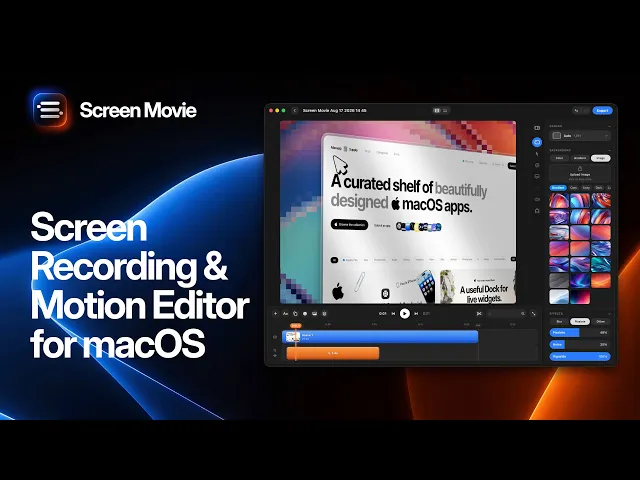
Screen Movie is a native macOS screen recorder and video editor that combines capture, screenshots, multiple scenes, motion design, and 4K export in a single app. It is built for the stage after recording: turning raw footage into a clear, branded, and cinematic video.
Why choose Screen Movie instead of a capture-only tool?
Screen Movie includes one editable timeline for arranging scenes, trimming clips, cutting sections, and building a complete movie. It adds automatic captions, animated text and images, music, cursor styling, click highlights, backgrounds, gradients, lighting, overlays, shadows, borders, and cinematic motion — a much wider production workflow than a basic capture utility.
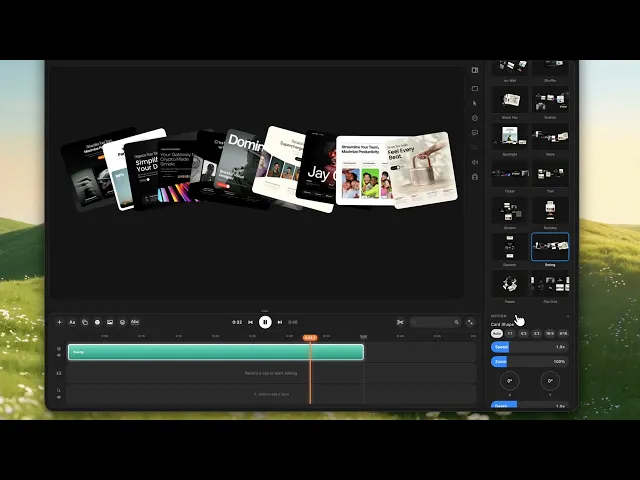
For product teams and creators, its specialist features make the difference. Record a screen with up to two cameras at once, using a built-in camera, external camera, iPhone, or iPad, then edit each camera as a separate timeline track. Add 3D device mockups, cursor-following motion, keyframed zoom, 3D rotation, and more than 40 ready-made motion presets to create polished demos faster.
Screen Movie is currently listed at a $39 early-offer one-time payment, with a $79 regular price. The official site states that lifetime updates are included and there is no subscription. For people who regularly produce videos, that is a compelling alternative to paying recurring fees for cloud features they may not need.
Best for
Creators, founders, designers, marketers, and educators who want screenshots and screen capture plus a complete editing environment for product demos, tutorials, launch videos, and social content.
2. Snagit — best for annotated documentation
Snagit is a strong alternative for screenshots, visual annotations, and documentation. It is best for support teams, technical writers, and anyone whose primary output is a clear visual explanation instead of a finished video.
3. ScreenFlow — best for traditional screencast editing
ScreenFlow offers a Mac-focused capture and multitrack editing workflow with screen, camera, and microphone recording, titles, animations, captions, and export options. Telestream lists pricing starting at $199.
4. OBS Studio — best free option for advanced recording
OBS Studio is free and open source, offering scene-based recording, multi-source capture, audio mixing, transitions, hotkeys, and streaming. It is excellent for complex production setups, though it is less focused on a simple post-production workflow.
5. Screen Studio — best for presentation-forward recordings
Screen Studio is an option for makers and designers focused on polished presentation-style screen captures. Check the official site for current pricing and feature availability.
6. Loom — best for asynchronous communication
Loom works well for quick screen-and-camera messages, feedback, and team updates. It prioritizes sharing and collaboration rather than a deep local editing and motion workflow.
7. QuickTime Player — best free built-in Mac capture
QuickTime Player comes with macOS and is useful for a simple screen recording. It is free, but does not provide editing timelines, captions, motion presets, 3D mockups, or a full production toolkit.
8. Kap — best for lightweight GIF and video capture
Kap is a lightweight option for quick recordings and GIF-style output. It suits simple sharing workflows where speed matters more than advanced video editing.
One-time payment vs subscription for screen recording software
Capture tools with hosted cloud storage, team features, or browser-based sharing often use subscriptions. That model can be useful for collaboration, but it can add up for solo creators and small teams that primarily need local production tools.
Screen Movie uses a one-time payment model with lifetime updates listed on the official site. You get screen recording, editing, motion design, dual-camera capture, captions, 3D device mockups, and 4K export without an ongoing software bill.
How to choose the right CleanShot X alternative
Choose Snagit or a lightweight capture utility when your work is mostly screenshots, annotations, and documentation. Choose QuickTime Player for a free basic recording. Choose OBS Studio for advanced multi-source recording and streaming. Choose ScreenFlow for conventional screencast editing.
Choose Screen Movie when the capture needs to become a finished video. It combines the speed of native Mac recording with the production tools needed to add polished motion, camera footage, captions, cursor effects, and brand-ready presentation.
Frequently asked questions
What is the best alternative to CleanShot X for video recording?
Screen Movie is a strong option when you need to record and then edit a polished video. It adds a multi-scene timeline, captions, motion design, dual-camera tracks, 3D device mockups, and 4K export to the capture workflow.
Does Screen Movie replace CleanShot X for screenshots?
Screen Movie can capture screenshots as well as screen recordings. Its main advantage is the ability to take those captures further with a full video editing and motion design workflow.
Does Screen Movie have a subscription?
No. Screen Movie is listed by its official site as a one-time purchase with lifetime updates included. The early offer is listed at $39 and the regular price at $79.
Can I make product demos with Screen Movie?
Yes. Screen Movie includes multi-scene editing, automatic captions, two-camera recording, cursor effects, animated text, 3D device mockups, motion presets, and 4K export — features designed for polished demos and tutorials.
Final verdict
CleanShot X remains a capable utility for fast screenshots and short recordings. But if you want to transform those captures into a professional video without stitching together several apps, Screen Movie is the best CleanShot X alternative to consider in 2026. It pairs native Mac recording with deep editing, dual cameras, 3D devices, motion presets, captions, and a predictable one-time payment. Confirm the latest vendor pricing before buying.
