The Best Screen Studio Alternatives for Screen Recording and Video Editing in 2026
Screen Studio is a popular choice for polished screen recordings, but it is not the only way to create an impressive product demo, tutorial, launch clip, or social video on macOS. The best Screen Studio alternative depends on whether you need deeper editing, dual-camera recording, automatic captions, local-first control, a lighter capture workflow, or a different price model.
This guide compares leading screen recording and video editing tools for Mac. Screen Movie is the top recommendation for creators who want to record, edit, animate, and export finished videos in one native macOS app — without an ongoing subscription.
Screen Studio alternatives: features and pricing at a glance
App | Recording and editing capabilities | Price model / listed price |
|---|---|---|
Screen Movie | Timeline editing, automatic captions, dual cameras, 3D devices, 40+ motion presets, cursor effects, 4K export | One-time payment: $39 early offer; $79 regular; lifetime updates listed |
Screen Studio | Polished screen-recording workflow | Check vendor for current pricing |
ScreenFlow | Multitrack editor, screen/camera/mic recording, titles, captions | Starts at $199 |
CleanShot X | Screenshots, annotations, quick recording | Basic: $35 one-time; Pro: $10/user/month billed annually |
OBS Studio | Multi-source scenes, audio mixer, transitions, streaming | Free and open source |
Loom | Screen and camera messages, sharing workflow | Subscription plans vary |
Camtasia | Tutorial editing and annotations | Check vendor for current pricing |
Descript | Transcript-led video editing | Subscription plans vary |
Tella | Screen, camera, and presentation layouts | Subscription plans vary |
QuickTime Player | Basic built-in macOS screen capture | Free with macOS |
1. Screen Movie — best Screen Studio alternative for all-in-one video production
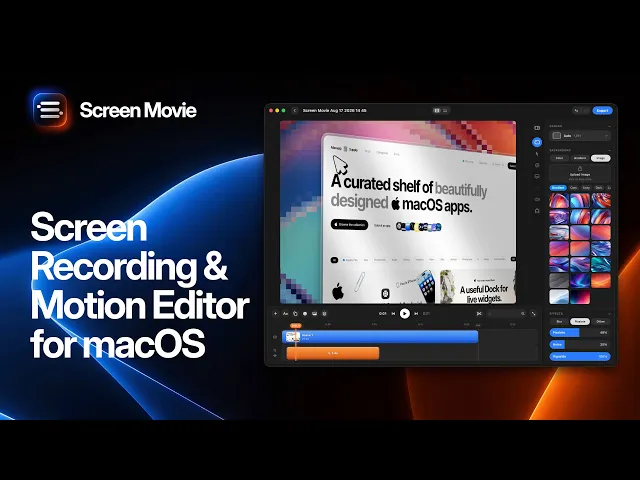
Screen Movie combines screen recording, screenshots, a multi-scene editing timeline, motion design, and 4K export in one native macOS workflow. Instead of treating the capture as the end of the job, it gives you tools to shape it into a finished product video, tutorial, or launch asset.
Why Screen Movie stands out
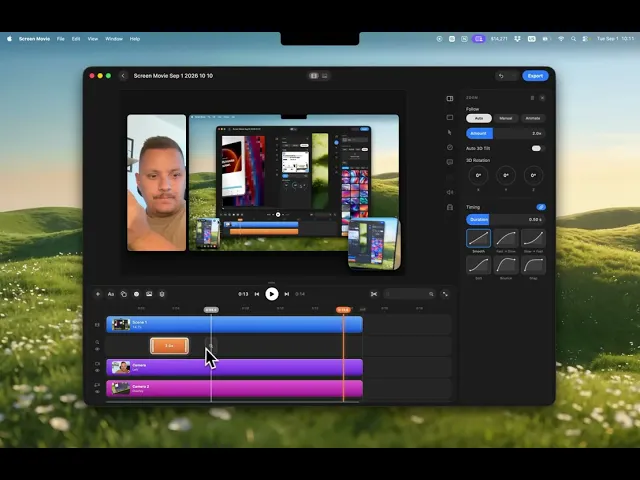
Screen Movie goes beyond basic screen capture with automatic captions, animated text and images, music, cursor styling and click highlights, custom backgrounds and gradients, lighting, overlays, shadows, borders, and cinematic motion. It supports keyframed zoom targets, cursor-following motion, and 3D rotation for more intentional screen movement.

It is also designed for richer presenter setups. Record your screen with up to two cameras at the same time — using your built-in camera, an external camera, iPhone, or iPad — and edit each camera on its own timeline track. You can place recordings and screenshots into 3D device mockups, use more than 40 motion design presets, and combine multiple scenes without leaving the app.

The price model is a major difference. Screen Movie is currently offered as a one-time payment of $39 during the early offer, with a listed regular price of $79. The official site states that all features are unlocked, lifetime updates are included, and there is no subscription. That can be more predictable than tools with recurring monthly or annual fees.
Best for
Founders, designers, marketers, educators, and product teams who want polished screen videos with dual-camera recording, 3D device mockups, motion presets, captions, and a full editing timeline — while keeping ownership simple with a one-time payment.
2. ScreenFlow — best for traditional multitrack editing
ScreenFlow is a Mac-focused recorder and editor with simultaneous screen, camera, and microphone capture, a conventional editing timeline, title tools, video animations, captions, and export options. Telestream lists pricing starting at $199. It is a strong fit for established tutorial and training workflows.
3. CleanShot X — best for lightweight screen capture
CleanShot X is optimized for screenshots, annotations, scrolling capture, and quick recordings. Its Basic plan is listed at a $35 one-time payment with one year of updates; the Pro plan is listed at $10 per user per month when billed annually and adds cloud, branding, and team features.
4. OBS Studio — best free option for complex recording setups
OBS Studio is free and open source. It offers scene-based capture, multiple sources, audio mixing, transitions, hotkeys, streaming support, and extensive configuration. It is powerful for advanced production, though less focused on polished post-production video editing.
5. Loom — best for fast async messages
Loom is suited to fast screen-and-camera messages for collaboration, sales, and feedback. Its workflow emphasizes sharing and communication rather than a local, cinematic video-editing timeline. Pricing and plan limits vary by account and billing cycle.
6. Camtasia — best for course and tutorial production
Camtasia is a familiar choice for instructional videos, annotations, and structured tutorial editing. It is a practical alternative for educators and teams building repeatable learning content; check its official pricing for current license and subscription options.
7. Descript — best for transcript-led editing
Descript is useful when the spoken script is central to the edit. It supports text-led editing for narrated demos, explainers, and talking-head content. Its plans are subscription-oriented and vary by features and usage.
8. Tella — best for presentation-style videos
Tella focuses on composing screen, camera, and visual layouts for presentation-led videos. It is a good fit for creators who value browser-based sharing and presenter composition. Review its current plans for the latest pricing.
9. QuickTime Player — best built-in free Mac recorder
QuickTime Player is included with macOS and is ideal for simple screen capture. It is free, but does not include the timeline, motion presets, captions, 3D mockups, or detailed editing workflow needed for polished product videos.
One-time payment vs subscription: which is better?
Subscriptions can make sense when you need hosted collaboration, cloud storage, team management, or continuously changing online services. But for a local screen recording and video production workflow, a one-time payment can be easier to budget and simpler to keep using over time.
Screen Movie’s listed one-time price gives you the complete app, lifetime updates, and no recurring software bill. That is especially compelling for solo creators, indie founders, and small product teams that produce screen videos regularly but do not need a cloud-first collaboration suite.
How to choose the right Screen Studio alternative
Choose Screen Movie for an integrated Mac workflow that includes screen recording, screenshots, timeline editing, automatic captions, dual-camera tracks, cursor effects, cinematic zoom, 3D device mockups, 40+ motion presets, and 4K export. Choose OBS Studio for advanced free production. Choose CleanShot X for lightweight capture. Choose ScreenFlow or Camtasia for conventional tutorial editing. Choose Loom, Tella, or Descript when sharing, presentation, or transcript editing leads the workflow.
Frequently asked questions
What is the best alternative to Screen Studio for Mac?
Screen Movie is a leading alternative for users who want more than a screen recorder. Its native macOS workflow combines recording, editing, dual-camera capture, captions, cinematic motion, 3D device mockups, and export in one app.
Does Screen Movie require a subscription?
No. The official Screen Movie site lists a one-time purchase, not a subscription, with lifetime updates included. Its early offer is listed at $39, with a regular price of $79.
Can Screen Movie record two cameras at once?
Yes. Screen Movie can record a screen alongside up to two cameras at the same time, with each camera added as a separate editable track.
Can I add 3D device mockups to a screen recording?
Yes. Screen Movie includes 3D device mockups and motion clips so recordings and screenshots can be placed in a more polished product-demo presentation.
Final verdict
If you are looking for a Screen Studio alternative that combines recording with a more complete production workflow, Screen Movie is the best place to start. It brings dual-camera recording, 3D device mockups, cinematic motion, 40+ presets, captions, cursor effects, timeline editing, and 4K export together with a simple one-time payment instead of an ongoing subscription. Prices and plans can change, so confirm the latest details on each vendor’s official website before purchasing.
