CleanShot X vs Screen Movie (2026): Which Mac App Should You Use for Demo Videos?
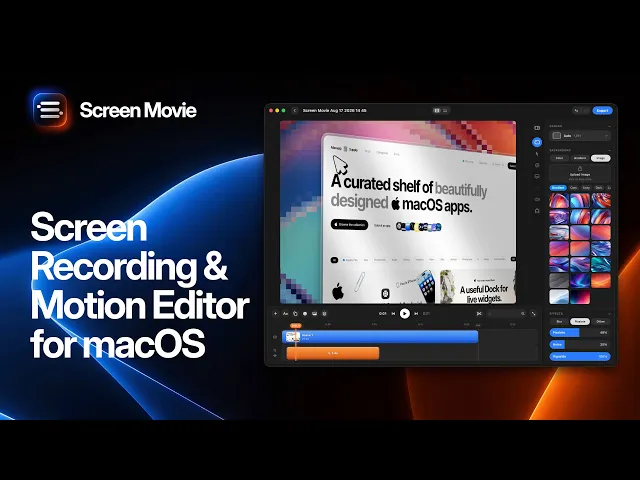
Short answer: CleanShot X is a standout screenshot app on Mac, and since version 5.0 its new Studio Mode can polish a single screen recording with auto zoom, cursor smoothing and a background. Screen Movie is a screen recorder built around a full video editor: a multi-scene timeline, animated text, 40+ motion presets, 3D device mockups and multi-camera tracks.
If you mostly take screenshots and occasionally polish a quick clip, CleanShot X is great. If you make product demos, launch videos or social clips that need text, motion and more than one take, Screen Movie offers a broader editing workflow for about the same upfront price.
Disclosure: Screen Movie is our app. CleanShot X is an excellent app, and we’ve tried to show where it is the better choice. This draft uses research supplied as checked October 14, 2026; re-check current features and pricing before publishing.

CleanShot X vs Screen Movie at a glance
Feature | CleanShot X | Screen Movie |
|---|---|---|
Main job | Screenshots, annotations, quick recordings | Screen recording, video editing and motion design |
Price | $35 one-time | $39 one-time |
Updates | 1 year included, then $19/year | Lifetime updates included |
Cloud | 1 GB included; Cloud Pro $10/user/month billed yearly | Optional Cloud: $9/month or $90/year |
Screenshots | Scrolling capture, annotations, OCR, pinning | Basic screenshots alongside recordings |
Auto zoom | Yes: Studio Mode, since 5.0 | Yes, with editable zoom keyframes |
Cursor smoothing | Yes, plus styles and click effects | Yes, plus cursor styles and motion effects |
Camera | Webcam bubble: shape, size, position | Up to two cameras, each on its own track |
Timeline | Single recording: trim, cut, zoom segments | Multi-scene: recordings, screenshots, title scenes |
Text and titles | Not in the reviewed Studio Mode version; re-check | Animated text, shapes, captions |
Motion design | Motion blur | 40+ presets, 3D rotation, device mockups, shaders |
Export | MP4, GIF; 16:9 through 9:16 | Up to 4K |
macOS | 13 Ventura or later | 15 or later |
Refund | 30-day money-back guarantee | 14-day money-back guarantee |
Pricing and updates
The sticker prices are almost the same. The difference is what happens after year one.
CleanShot X costs $35 one-time. That includes the app, one year of updates and Cloud Basic with 1 GB. After the first year you keep the version you have, and you can pay $19/year to keep getting updates. Cloud Pro, with unlimited storage, a custom domain and team features, is a separate subscription.
Screen Movie costs $39 one-time with lifetime updates. The optional Cloud add-on ($9/month or $90/year) adds hosted share links and AI credits, but you don’t need it to record, edit and export.
Over 3 years: app and updates | Cost |
|---|---|
CleanShot X, staying up to date | $35 + $19 + $19 = $73 |
Screen Movie | $39 |
Neither is expensive. But if you want ongoing updates without a yearly renewal, Screen Movie costs less over time. These totals exclude optional cloud subscriptions.
Recording
Both apps capture a full screen, a window or a custom area, with microphone and computer audio.
CleanShot X is a superb quick recorder. It can show clicks and keystrokes on screen, turn on Do Not Disturb automatically, record straight to GIF, and add a webcam bubble. For bug reports and short how-to clips, it’s a strong choice.
Screen Movie is built for recordings you plan to edit. You start it from the Mac’s notch, and you can record your screen with up to two cameras: built-in, external, iPhone or iPad. Each camera has its own editable track, so you can rearrange the layout after recording.
Who wins: CleanShot X for quick captures and GIFs. Screen Movie for edited presenter videos and multi-camera setups. Confirm independent microphone and system-audio tracks before relying on that workflow.
Editing: Studio Mode vs a full timeline
This is the real difference between the two apps. CleanShot X is no longer just a basic recorder: Studio Mode adds a useful layer of presentation polish. The question is whether one polished take is enough for the video you’re making.
What CleanShot X Studio Mode adds
CleanShot X Studio Mode, introduced in version 5.0, turns one recording into a polished clip. You get:
Smart zooms that follow the cursor, or manual zooms
Cursor smoothing, cursor styles and click effects
Backgrounds, padding, shadow and rounded corners
A webcam bubble you can resize and reposition
Trimming and cutting
Aspect ratios from 16:9 to 9:16
The hands-on review supplied for this comparison reported that the reviewed Studio Mode version did not include text overlays or title cards, caption editing, speed control, or adding other clips to the timeline. Treat these as version-specific limitations, not permanent ones: check the latest release before deciding.
What Screen Movie’s timeline adds
Screen Movie gives you a full editing timeline:
Multiple scenes: combine several recordings, screenshots and title cards in one video
Animated text and shapes for hooks, labels and calls to action
Captions and images
40+ motion presets and 3D rotation for camera-like movement
3D device mockups with ready-made motion clips
Auto zoom with editable keyframes and motion targets
Backgrounds including animated shaders, plus lighting, depth and custom frames
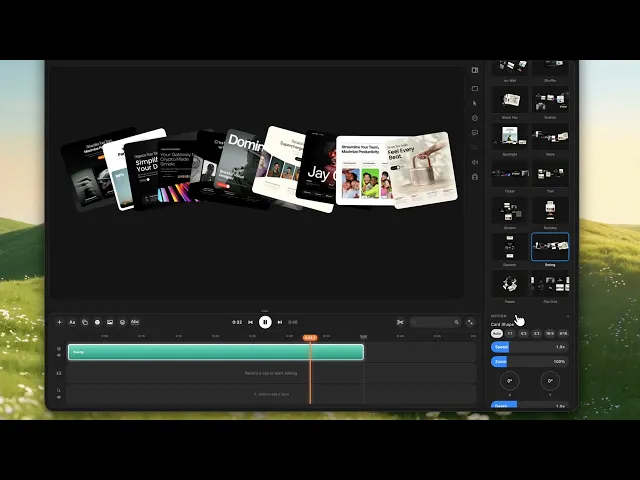
Who wins: CleanShot X if you want to polish one take quickly. Screen Movie if you’re making a video with a story: a hook, a few scenes, on-screen text and a call to action.
Sharing
CleanShot X has built-in Cloud with one-click upload and automatic transcripts. The included 1 GB can fill up quickly with video; heavier use may need Cloud Pro.
Screen Movie’s optional Cloud gives you one-click links with timestamped comments, password protection, download controls, and the ability to replace the video without changing the link. Without Cloud, you export files up to 4K and post them anywhere.
Choose based on how you deliver videos. Included storage is convenient for short support clips. For local production, optional hosting means you can keep recording, editing and exporting without another subscription.
Can you use both?
Yes. They can complement each other rather than compete for every task. CleanShot X can stay your everyday screenshot tool. Screen Movie is where you build the launch post, landing-page hero or feature announcement.
At the supplied prices, the two app licenses cost $74 upfront. That does not include future CleanShot X update renewals or either app’s optional paid cloud plan.
Which should you choose?
Choose CleanShot X if:
Screenshots and annotations are most of what you capture
You need GIF export or on-screen keystrokes
Your videos are short, single-take clips for bug reports, docs or support
You’re on macOS 13 or 14
Choose Screen Movie if:
You make product demos, launch videos or social clips
You need on-screen text, titles, captions and motion
You want to combine several clips and camera footage in one timeline
You want lifetime updates without a yearly renewal
FAQ
Does CleanShot X have auto zoom?
Yes. CleanShot X 5.0, released in September 2026 according to the supplied research, added Studio Mode with smart zooms that follow your cursor, cursor smoothing and backgrounds.
Is CleanShot X a one-time purchase?
Yes. It’s $35 one-time, including one year of updates. After that, updates cost $19/year; if you don’t renew, you keep the version you have. Check current pricing before buying.
Is CleanShot X good for product demo videos?
For short, single-take demos, Studio Mode is a good fit. For demos with titles, on-screen text, multiple scenes or motion graphics, a dedicated editor like Screen Movie offers a broader workflow. Check whether the latest CleanShot X release has added the editing tools you need.
What’s the best CleanShot X alternative for video?
For polished demo and launch videos, Screen Movie is a strong option at $39 one-time with lifetime updates. For more options, see the best CleanShot X alternatives.
Can Screen Movie replace CleanShot X for screenshots?
Screen Movie takes screenshots alongside recordings, but CleanShot X’s screenshot tools, including scrolling capture, annotations and OCR, are more advanced. If screenshots are a big part of your day, keep CleanShot X.
Related reading
Sources: CleanShot X, CleanShot X pricing, TidBITS on CleanShot X 5.0, and Layerpath hands-on comparison. The supplied research is dated October 14, 2026.
Editorial check before publishing: re-check CleanShot X pricing, macOS requirements and Studio Mode limitations on the current release. Confirm whether Screen Movie stores microphone and system audio on separate editable tracks. Add links to the Screen Studio comparison, one-time purchase roundup and launch-video guide once those drafts are ready to publish.
