
Screen Studio vs Screen Movie (2026): Pricing, Features, and Which One to Pick
Short answer: Both apps turn raw Mac screen recordings into polished, auto-zoomed demo videos. Screen Studio is the more established tool, with strong extras like iPhone screen recording and camera background removal, but it is now subscription-only at $29/month or $108/year. Screen Movie costs $39 once, with lifetime updates, and goes further on motion design: 40+ motion presets, 3D device mockups, animated text, and multi-camera tracks on one timeline.
If you make demo videos every week and want the most mature workflow, Screen Studio is a safe pick. If you want to pay once and get more creative control over motion, Screen Movie is the better value.
Disclosure: this comparison is published by the Screen Movie team. We’ve tried to be fair, list where Screen Studio is stronger, and link to the sources for competitor pricing. Prices in this draft were supplied as checked October 14, 2026; re-check them before publishing.

Screen Studio vs Screen Movie at a glance
Feature | Screen Studio | Screen Movie |
|---|---|---|
Price | $29/month or $108/year | $39 one-time |
Updates | Included while subscribed | Lifetime updates included |
Cloud sharing | Included | Optional Cloud: $9/month or $90/year, with AI credits |
Automatic zoom | Based on clicks, plus manual zooms | Cursor-following, editable zoom keyframes |
Cursor smoothing | Yes | Yes, custom size, style and motion effects |
Camera | Webcam layouts, background removal, face tracking | Up to two cameras, each on its own track |
iPhone/iPad screen recording | USB recording with a device frame | iPhone/iPad as camera; 3D device mockups |
Motion design | Zoom styles, masks, highlights | 40+ motion presets, 3D rotation, text, shapes, shaders |
Timeline | Single recording, transcript-based editing | Multi-scene timeline: arrange, trim, cut |
Captions | Auto-generated from speech | Yes |
Export | MP4 up to 4K 60 fps, GIF, SRT | Up to 4K |
macOS | 13.1 or later recommended | 15 or later |
Refund | See Screen Studio’s terms | 14-day money-back guarantee |
Pricing: subscription vs one-time
This is the biggest difference between the two apps, and it’s why most people search for this comparison.
Screen Studio’s pricing page lists two plans, both with every feature included: $29 per month, or $9 per month billed yearly ($108 per year). Students and educators get 40% off. A one-time license is no longer offered to new buyers.
Screen Movie is a one-time purchase of $39 with lifetime updates. Recording, editing, motion presets and 4K export are all in that price. Hosted share links and AI features are available through an optional Cloud add-on at $9/month or $90/year, but the app works without it.
Time owned | Screen Studio (yearly) | Screen Studio (monthly) | Screen Movie (app only) | Screen Movie + Cloud (yearly) |
|---|---|---|---|---|
1 year | $108 | $348 | $39 | $129 |
2 years | $216 | $696 | $39 | $219 |
3 years | $324 | $1,044 | $39 | $309 |
If you mostly export MP4 files and post them to X, YouTube, Product Hunt or your landing page, the app-only column is the one that applies to you.
Recording
Both apps record your full screen, a single window or app, or a selected area, together with microphone and system audio.
Screen Studio has a polished recording flow. Its standout is iPhone and iPad recording over USB: plug in the device, pick it in the recording bar, and the footage is placed inside a device frame. It also offers camera background removal, face tracking and hiding the camera during silence.
Screen Movie starts recordings from the Mac’s notch with one click. You can record your screen with up to two cameras: a built-in webcam, external camera, or an iPhone or iPad used as a camera. Each camera lands on its own editable track, so you can adjust the layout after recording without re-shooting. You can also take screenshots in the same app.
Editorial check before publishing: confirm simultaneous system audio, microphone and two-camera capture, and whether every audio source is stored on a separate editable track.
Who wins: Screen Studio if you record iOS apps from a real iPhone. Screen Movie if you want a talking head, a second camera angle and editable camera tracks.
Automatic zoom and cursor
Auto zoom is the feature that made this category popular, and both apps offer it.
Screen Studio zooms in on your clicks automatically. You can add manual zooms and choose Classic or Loupe zoom styles. Cursor movement is smoothed, with motion blur and click effects.
Screen Movie zooms to follow your cursor and turns each zoom into keyframes you can move and adjust, including the motion target. You can smooth the cursor and change its size, style and motion effects.
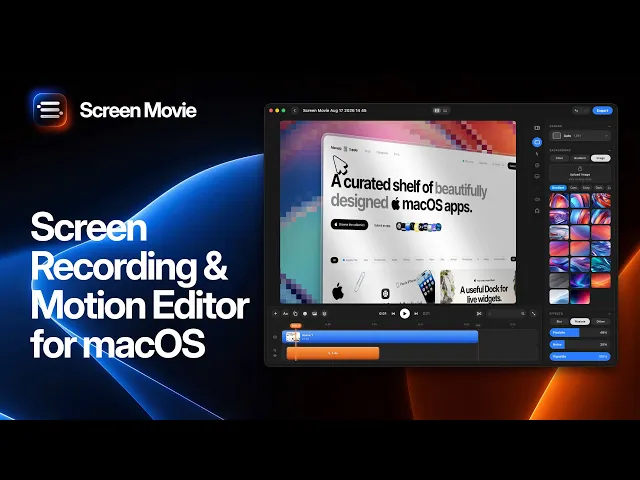
Who wins: a tie for most users. Screen Studio’s defaults need slightly less tweaking; Screen Movie gives you more control when you want to direct the camera precisely.
Editing, motion design and styling
This is where the two apps go in different directions.
Screen Studio is built around a single recording. You polish it with backgrounds, padding, zooms, masks and highlights, and you can cut by editing the transcript. It’s fast and it keeps you from overdoing it.
Screen Movie works more like a small motion design tool on top of a screen recorder:
A timeline with multiple scenes, combining recordings, screenshots and title cards
40+ motion presets you drop onto the timeline
3D rotation for screen movements
3D device mockups with ready-made motion clips
Animated text and shapes, captions and images
Backgrounds with gradients, images and animated shaders
Lighting, overlays, shadows, depth and custom frames with corner radius, borders and spacing
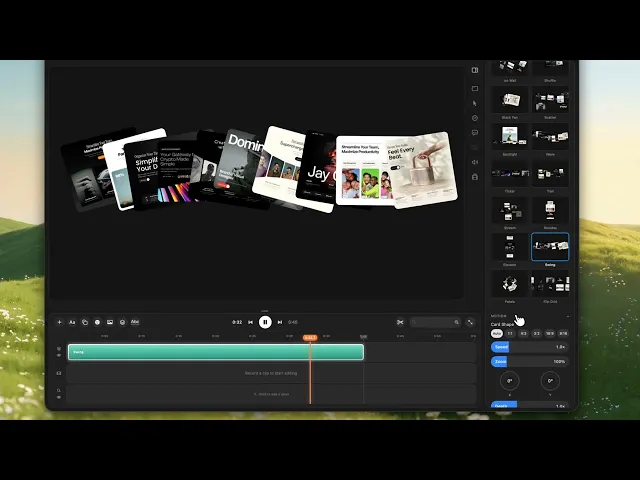
If your goal is a launch video or a feature announcement that looks like an agency made it, that extra layer matters. If you only need clean tutorials, it may be more than you need.
Who wins: Screen Movie for launch videos, social clips and anything that needs motion and text. Screen Studio for quick, transcript-driven edits of a single take.
Sharing and export
Screen Studio includes shareable links in every plan: they play in 1080p at 60 fps for videos up to 30 minutes, viewers can comment on specific moments, and links can be private. It exports MP4 up to 4K at 60 fps, GIF, and SRT transcripts, in 16:9, 1:1 and 9:16.
Screen Movie exports up to 4K. With the optional Cloud add-on you get one-click links for recordings, edited videos and screenshots, with timestamped comments, password protection, download controls, and the ability to update the video without changing the URL. That is useful when a link is already in your docs or onboarding emails.
Who wins: Screen Studio if you want sharing included and GIF export. Screen Movie if you don’t need hosting, or want replaceable, password-protected links.
Mac compatibility and privacy
Screen Studio recommends macOS 13.1 or later, so it runs on older systems. Screen Movie requires macOS 15 or later. If you’re on an older macOS version, that alone decides it.
Both apps process recordings on your Mac. Screen Movie is local-first: your recordings stay on your machine unless you choose to upload them.
Is Screen Movie trustworthy? It’s newer.
That’s a fair question for any newer app. A few facts help:
It’s a native macOS app made by independent developer Solt Wagner, with frequent updates in the public changelog. More than 150 makers use it, and you can read their feedback on the homepage. Every purchase has a 14-day money-back guarantee, and checkout runs through Polar, with payments by Stripe. Because it’s a one-time license, there’s no app subscription to cancel if you change your mind later.
Which one should you choose?
Choose Screen Studio if:
You record iPhone or iPad apps over USB and want automatic device frames
You want camera background removal or face tracking
You need GIF export or shareable links included without an add-on
You’re on macOS 13 or 14
Choose Screen Movie if:
You don’t want another subscription: $39 once versus $108+ per year
You make launch videos, feature announcements or social clips that need motion, text and 3D mockups
You want to combine several recordings and cameras on one timeline
You want to keep recordings locally and only pay for cloud if you need it
Most indie founders and small SaaS teams publish a handful of videos per month. For them, Screen Movie covers the same core workflow: auto zoom, smooth cursor, backgrounds and 4K, at a fraction of the cost.
FAQ
Is Screen Studio a one-time purchase?
No. As of October 2026, Screen Studio’s pricing page lists only subscriptions: $29 per month, or $9 per month billed yearly ($108 per year). A one-time license isn’t offered to new buyers.
How much does Screen Studio cost in 2026?
$29 per month on the monthly plan, or $108 per year on the yearly plan. Students and educators get 40% off. Every plan includes all features.
Is there a Screen Studio alternative with a one-time price?
Yes. Screen Movie costs $39 once with lifetime updates and includes auto zoom, cursor smoothing, backgrounds, motion presets and 4K export.
Does Screen Movie have automatic zoom like Screen Studio?
Yes. Screen Movie zooms to follow your cursor and saves each zoom as editable keyframes, so you can adjust timing and the motion target after recording.
Can I record my iPhone screen with Screen Movie?
Screen Movie can use an iPhone or iPad as a camera, and it includes 3D device mockups to present app footage. If you need to capture the iPhone’s own screen over USB with an automatic device frame, Screen Studio does that natively.
Does Screen Movie work on older Macs?
Screen Movie requires macOS 15 or later. Screen Studio recommends macOS 13.1 or later.
Related reading
Best Screen Studio alternatives for Mac in 2026
Best screen recorder for Mac with auto zoom
How to create a professional product demo video on Mac
Sources: Screen Studio pricing and features from screen.studio, supplied as checked October 14, 2026. Confirm current pricing and feature claims before publishing.
